Tour 2 - Preserving Unit Histories
Introduction
UnitTimeline.com provides a set of tools that makes it easy to present unit histories in an easy-to-understand format while also preserving detailed information and making it easily accessible.
Family and Friends of Veterans
UnitTimeline.com supports family and close friends of veterans who may want to pass along items of historical interest. Family of a deceased veteran can create an account on behalf of the veteran.
Family members can participate in unit discussions forums, correspond with other members of UnitTimeline.com, upload photos of the veteran, and more.
Whenever and wherever a friend or relative is operating an account on behalf of a deceased veteran, UnitTimeline.com makes it clear to the other users they are corresponding with a relative or friend, and not the actual veteran.
The next five screens describe these features.
Use these arrows to navigate to the next screen.
Histories are Stored and Presented Per Unit
Units are defined and established in UnitTimeline.com by our veteran members.
And for each unit, our members build out the unit's history by operating our easy-to-use tools. The end result includes a historical timeline that is automatically built from data entered by our members. Each timeline presents a summary view of a unit's history. More information about unit timelines is presented later in this tour.
Types of Units in UnitTimeline.com
Three types of units can be established in UnitTimeline.com:
1. Standard Units
Standard units represent actual units established in the U.S. Armed Forces.
2. Training/MOS Units
Training/MOS units represent a location and class for basic training, boot camp, or any Military Occupational Specialties (MOS) school.
3. Virtual Units
Virtual units represent groups of members of the U.S. Armed Forces who have unique and shared characteristics in common.
Virtual units can be created in UnitTimeline.com to preserve and honor the history of any meaningful group of service members within the U.S. Armed Forces.
The service members may not have served in a formal unit. Or they may have served in different units and different branches of the U.S. Armed Forces. But regardless of their real-world unit affiliations, members of a virtual unit have some unique perspective of historical interest.
For example: A virtual unit named Female Veterans of the Gulf War can be established to present the history and contributions of women across different branches of the U.S. Armed Forces and different units during the Gulf War.
This would be a virtual unit because no such unit was ever formalized in the U.S. Armed Forces.
But women did in fact serve in the Gulf War in various branches and units. And they have unique and shared commonalities that bring them together in UnitTimeline.com as a Virtual Unit.
Use these arrows to navigate to the next screen.
Roles Per Unit
Each unit established in UnitTimeline.com has these four roles:
1. Owner
In order to be designated as an established unit in UnitTimeline.com, any unit needs to have a Unit Owner. This is the person taking responsibility for managing the history of the unit as presented in the unit's timeline and according to the UnitTimeline.com Terms of Service (TOS)
Unit owners may delegate unit management responsibilities to one or more timeline managers (see below).
2. Timeline Manager
Timeline managers are responsible for managing unit histories as presented in the unit's timeline and the associated photo albums, short stories, documents, and articles.
Timeline managers also help moderate their respective units' group discussion forums.
Any unit can have multiple timeline managers.
UnitTimeline.com members can request timeline manager status for any unit. And it is the decision of the unit owners to grant or deny any such requests.
3. Contributor
Contributors are people who were not members of the unit, but who have items of historical interest to share with the unit.
Contributors are typically family or close friends of veterans of the U.S. Armed forces who want to provide items of historical interest on behalf of a veteran who may no longer be alive or is otherwise not able to participate in UnitTimeline.com.
UnitTimeline.com members can request Contributor status for any unit. And it is the decision of the unit owners or timeline managers to grant or deny any such requests.
4. Members
Unit members are people who actually served in the U.S. Armed Forces in the units for which they are requesting membership in UnitTimeline.com - including both real units and virtual units.
UnitTimeline.com members can request member status for any unit. And it is the decision of the unit owners or timeline managers to grant or deny any such requests.
Use these arrows to navigate to the next screen.
Timelines
Timelines are the central feature for presenting the history of units within UnitTimeline.com because they make it easy to see the entire history of a unit at a glance, while also enabling navigation to the details of interest.
Notice each event in the sample timeline below has a “more info” link that can be used to show additional information about the events, including photo albums, documents, and articles or similar historical accounts.
Sample Timeline
| 1930 | |||||
|
|
|
1932 | Jan 01 |
These are all sample events just to show how actual timelines appear. |
|
|
|
|
1934 | Jul 23 |
Constituted in the Regular Army as Troop D, 354th Cavalry |
|
| 1940 | |||||
|
|
|
1943 | Jul 13 |
Awards Ceremony |
|
|
|
|
|
Sep 15 |
Supply chain protection. |
|
| 1950 | |||||
|
|
|
1951 | Mar 09 |
Disbanded |
|
|
|
|
1959 | May 04 |
Reconstituted in the Regular Army as Troop D, 354th Cavalry |
|
| 1960 | |||||
|
|
|
1962 | Dec 06 |
Activated |
|
|
|
|
1965 | Aug 31 |
Inactivated |
|
|
|
|
1966 | Sep 27 |
Redesignated as Headquarters and Headquarters Troop, 63rd Squadron, 354th Cavalry |
|
|
|
|
|
Nov 25 |
Activated |
|
|
|
|
|
Sep 15 |
These are all sample events. None are real. |
|
Date: (date appears here)
Location: Sample Location
Activity: Sample description of the sample event.
More Detailed Information
(more links can appear here)
NOTE: Timelines can have a practically unlimited number of events, from just a few, to dozens, hundreds, or even thousands of events.
Use these arrows to navigate to the next screen.
Timeline Management is Easy
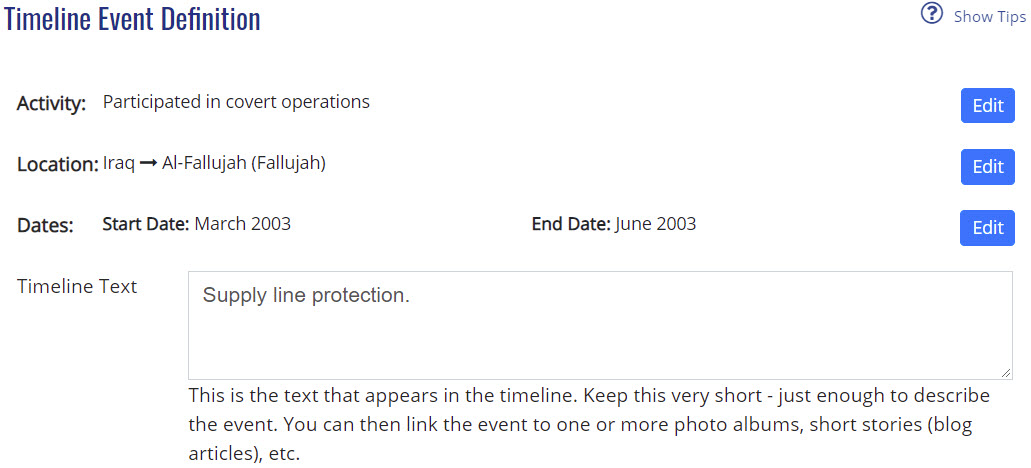
You only need to enter the information about each event and UnitTimeline.com will build the timeline for you.
For each event you specify these three parts:
- Activity: Brief description of the activity.
- Location: The location of the event.
- Dates: The date(s) of the event.
NOTE: This is a screen shot, not the actual interface.
Use these arrows to navigate to the next screen.
Your Photos
You can upload photos to your account and organize them into collections.
You can optionally add descriptions to each photo.
Your photos are automatically available to anyone who finds your profile using UnitTimeline.com's Member Search feature. When you appear in search results, the searching members will be able to view your photo collections.
To explicitly share your photos you can use UnitTimeline.com's Member Search and Unit Search features to find and engage unit timeline managers and other members who may have an interest in your photos. The timeline managers may include your images in their respective unit timelines and detailed unit histories.
Use these arrows to navigate to the next screen.
How to Share Items of Historical Interest
How you share your items of historical interest will depend on the type of items you have.
Digital Items
- Create an account here in UnitTimeline.com. You can click her to get started.
- Upload any photos, documents, or videos to your account.
- Optionally add descriptions to each uploaded item.
- Search for Units or individual members you believe may be interested in your collections.
- Join the relevant units as a Contributor, and proceed to engage the units' timeline managers using UnitTimeline.com's Direct Messager feature.
The timeline managers may be interested in your uploaded items and may use them in building out their unit timelines and histories.
Physical Items
If you have physical items of historical interest, what happens with those depends on the types of items and what may be the most reasonable proper destination.
Ideally any items can be scanned as an image or a document.
For items that cannot be easily scanned, consider taking a photograph for sharing in the relevant units here in UnitTimeline.com.
And beyond that, if the items should really be in a museum or other institution where the most relevant audience will appreciate them, we can help identify the proper destination and facilitate direct conversations between you and the curators.
Please contact us if you would like to talk about your items and what are the best alternatives for preservation and sharing.
Use these arrows to navigate to the next screen.
Next Steps
Click here to see Tour 1: Finding Units and Veterans.
Click here to see Tour 3: Connecting With Other Veterans.
Start now by creating your account and registering your time in the U.S. Armed Forces.