Tour 3 - Connecting With Veterans
Introduction
UnitTimeline.com offers three alternatives for connecting with veterans of the U.S. Armed forces:
1. Direct one-on-one messaging
2. Group messaging forums (one per unit)
3. Unit inquiry forms
Use these arrows to navigate to the next screen.
Direct Messenger
UnitTimeline.com provides a utility named Direct Messenger that facilitates the exchange of messages between members.
To contact members of UnitTimeline.com you would use the Member Search feature to find the members of interest. Then from the search results you can open Direct Messenger to initiate communications with any found member.
Communications via Direct Messenger are instantaneous, and allow for one-on-one conversations without exchanging private contact information.
Use these arrows to navigate to the next screen.
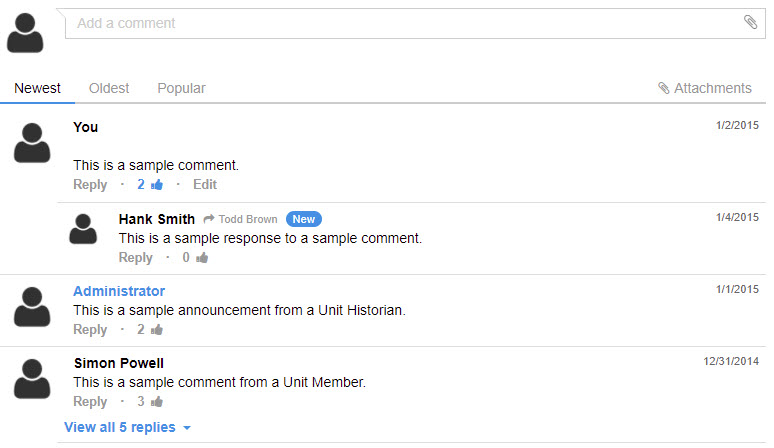
Group Messaging Forum For Each Unit
Each unit has its own group messaging forum.
Unit owners and timeline managers moderate the dialogue.
Only members of a unit have access to the unit's group discussion forum. And all unit members of each type (Owner, Timeline Manager, Contributor, and Member) have access to the unit's group discussion forum.
NOTE: This is a screen shot, not the actual interface.
Use these arrows to navigate to the next screen.
Unit Inquiry Forms
Each unit established in UnitTimeline.com has an inquiry form you can use to contact the unit owner or the unit's Timeline Manager(s).
Use the Unit Search feature to locate the units of interest, then proceed to view the Unit's timeline, and navigate from there to the unit's Contact Us page.
Use these arrows to navigate to the next screen.
Next Steps
Click here to see Tour 1: Finding Units and Veterans.
Click here to see Tour 2: Preserving Unit Histories.
Start now by creating your account and registering your time in the U.S. Armed Forces.